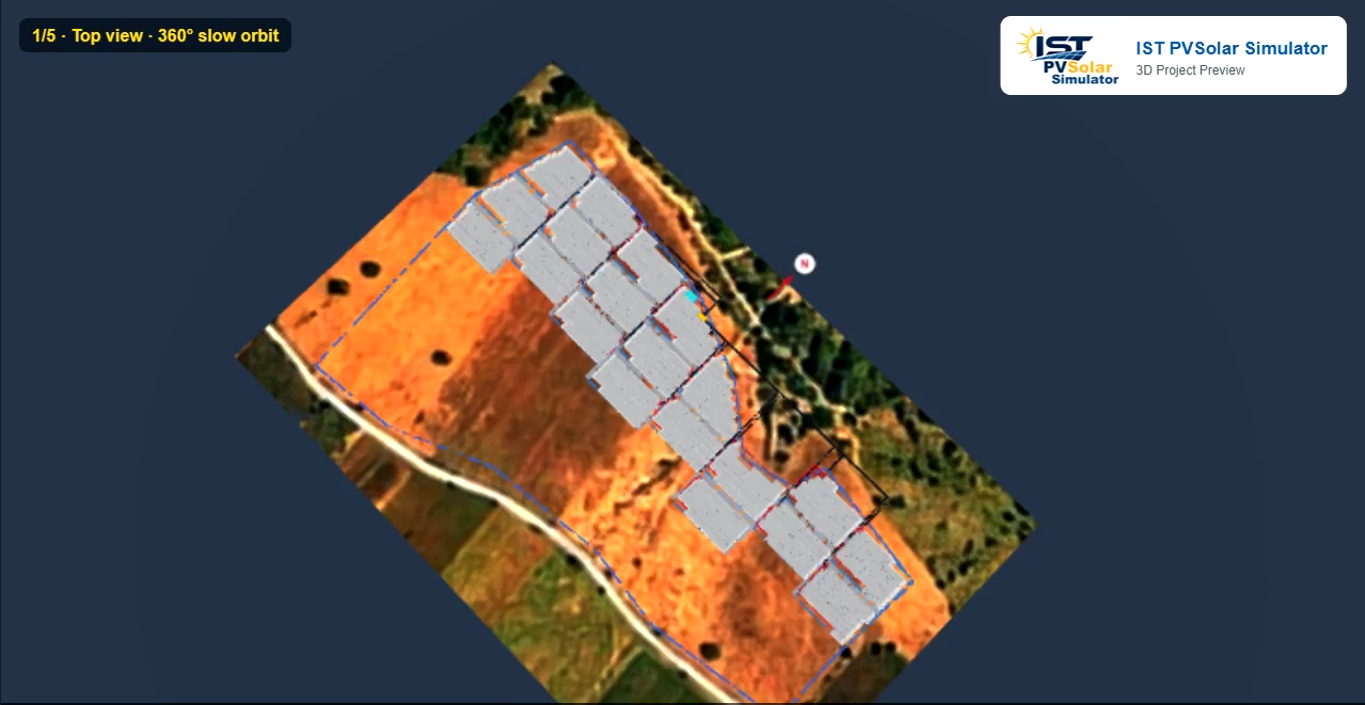
A 3D view is easy to make pretty. It is harder to make it honest. A solar designer uses the 3D Preview to decide row pitch, table height and string layout, and a client uses it to believe the design. If the picture disagrees with the table, or goes blank without explanation, both lose confidence. The sections below look at each quality, as seen while adding the new Record MP4 feature to the tool.
View on YouTube
One height, three views
The front edge height of a module table is stored once, and every view reads that one value. Change it in Shadow-Free Pitch Design, in the 3D tool's own Front Edge Min Ht field, or through Suggest Mounting Height, and all three places update together.
The rear edge height is never typed separately. It is worked out from the front height, the tilt, the number of modules stacked and the gap between them. So the Row Pitch Diagram and the 3D Preview always draw the same table, from the same inputs.
This matters because shading depends on height. A table drawn 0.3 m lower in 3D than in the pitch design would cast a different shadow, and the loss figure would quietly disagree with the drawing. Here, the pitch, lower edge and upper edge shown in the 3D toolbar are the same figures the Row Pitch Diagram table prints.
View | Where the front height comes from | Rear height |
|---|---|---|
Shadow-Free Pitch Design | Front Edge Min Ht field | Calculated |
Row Pitch Diagram | Same stored value | Calculated from tilt and table length |
3D Preview | Same stored value | Same calculation |
Shading per string, with its cause
The tool does not stop at a single shading-loss percentage. It lists shading string by string and names what causes it: a neighbouring row, a parapet, a tree, a building or another obstruction.
The shaded panels are also marked in red or orange on the 2D layout, and the marks clear when an array is moved out of the shadow. A designer can see the problem, name it, fix it and confirm the fix on the same screen.
A cause is what turns a number into a decision. "String S7 loses output to the parapet in winter mornings" points to a clear action, such as a higher table, a wider setback or a different string. A bare "3.2% shading loss" gives no hint where to look. Strings are labelled S1, S2… on a roof and GS1, GS2… on ground areas, so the labels match between the list, the 2D map and the 3D Preview.
Failing in plain words
When the 3D scene cannot be built, the tool says so on screen instead of showing an empty black box. The message reads "3D Preview failed to build", gives the technical reason, and states that this is a bug in the scene builder, not a problem with the user's project.
It also tells the user what to send: a screenshot of the message and, if possible, the project's .pro file. That turns a silent failure into a support ticket with the evidence attached.
The same care shows before the scene is even built. Open the 3D View too early and the tool explains the missing step: trace a roof outline first, set the scale so the model uses real metres, or check the internet connection if the 3D library did not load. A black canvas tells the user nothing; each of these messages tells them exactly what to do next.
Camera and sun, kept apart
The 3D Preview keeps two things separate: where the camera looks from, and where the sun is. The camera is four numbers (an orbit angle, a tilt, a distance and a target point) applied by one function. The sun is a date and an hour, turned into a sun direction by another function.
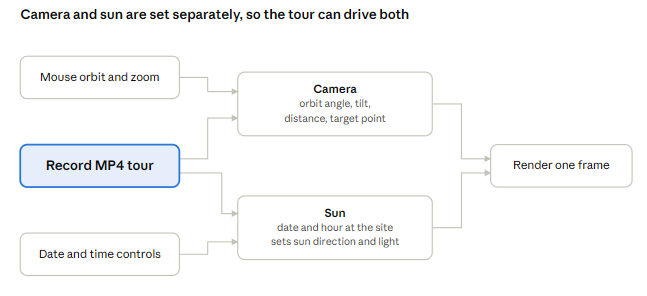
Because neither depends on the other, any part of the program can set one without disturbing the other. That is what made the new Record MP4 tour quick to build. The tour only had to set the camera for each shot and step the sun through the day:
- a slow 360° orbit from above the panel area
- a close move from the front of the rows to the back
- a close move from left to right
- an east-side view while the sun runs from 6:30 to 17:30 on Mar 21, Jun 21, Sep 21 and Dec 21
- a return to the starting view with a project summary
No shading, geometry or lighting code had to change. The recording draws the same scene the user already sees, so the video shows the same shadows the analysis uses. A tangled design, where moving the camera also reset the sun or rebuilt the scene, would have meant reworking the core of the tool instead.
What it means for designers and clients
For the designer, the 3D Preview can be relied on: what it shows matches the pitch design, its shading points to a cause, and its errors say what went wrong. Less time goes into cross-checking views, and more into fixing the design.
For the client, the result is a model they can believe and now a narrated video they can share. The Record MP4 tour states the project address, strings, panels, row pitch, front and rear table pole heights, and total DC kWp and AC kW, then shows the shadows on the four key days.
Consistency, explanation and honest errors rarely appear on a feature list. In a shading tool they matter more than any single feature, because they decide whether people trust its numbers.